In this guide
An XUV700 owner may want a familiar Guwahati workshop after a bumper impact while the ACKO app presents a digital claim journey. Before parts are ordered, connect those two decisions: tell ACKO where you intend to repair and ask which assessment and settlement route applies. CarTech Hub can help prepare the inspection and estimate, but the insurer determines claim acceptance and whether any cashless arrangement is available for the chosen repair.
Speak to CarTech Hub before committing the job
Share the registration, accident account and safe photographs with CarTech Hub. Describe new noises, leaks or warnings and whether the vehicle can move safely. Do not continue driving to make a symptom repeat if wheel clearance, steering or cooling condition is uncertain. An initial workshop assessment can explain the likely areas needing inspection without being an approval to begin claim repairs. Keep the damaged condition available and retain the original image files for the insurer's directions.
Open the ACKO claim and confirm the repair route
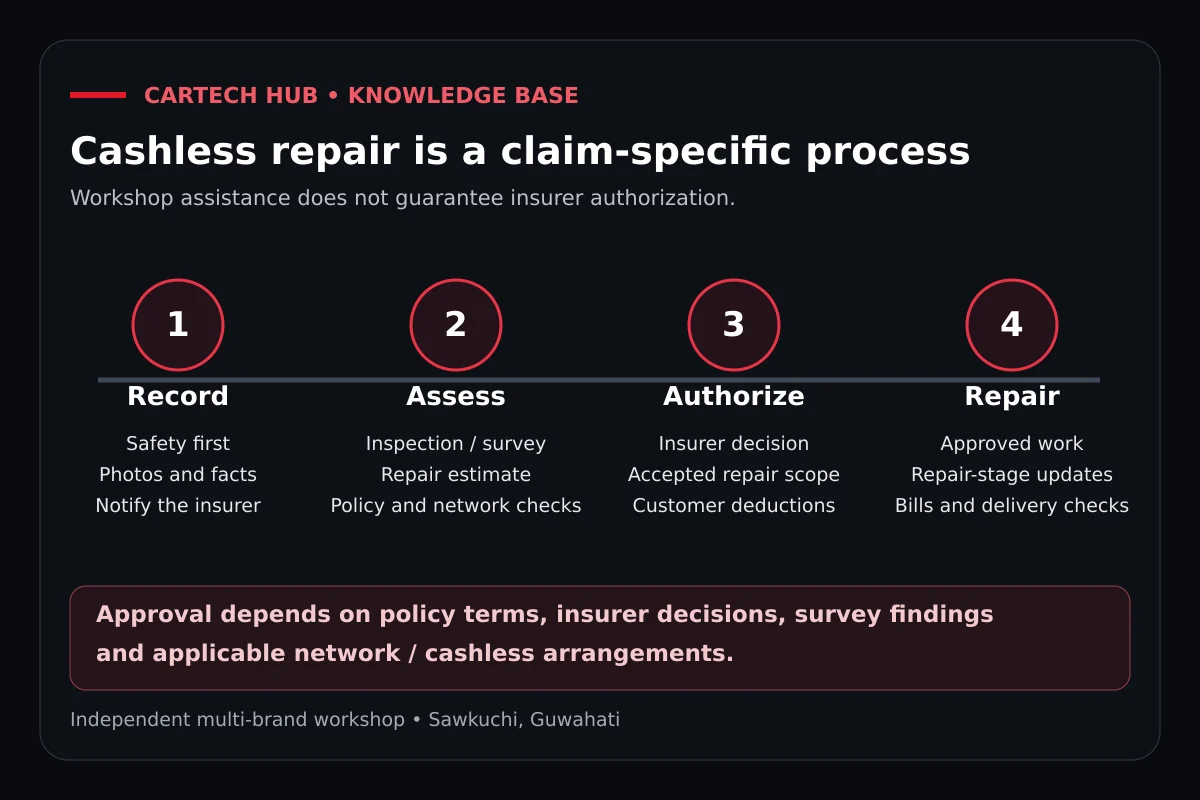
ACKO's official car claims page describes raising a claim through its website or mobile app and cashless settlement with partner garages. Use your policy account, enter the incident accurately and keep the claim reference. Ask ACKO how an intended CarTech Hub repair should be assessed and whether cashless or reimbursement handling is permitted for this case. An app acknowledgement is not confirmation that this workshop is a partner or that every line of its future estimate is payable.
Check own-damage insurance and the deductions
Read the policy schedule and applicable wording for the accident date. Own-damage cover is needed for repairs to your own XUV700; third-party-only insurance does not provide it. Distinguish an older warning, worn tyre or pre-existing scratch from the reported impact. Check purchased add-ons individually rather than treating them as a complete waiver of owner costs. Deductibles, depreciation and non-payable items can leave a balance even where the claim is accepted, and should inform your repair consent.
Keep the vehicle identity within the digital file
Mahindra's XUV700 equipment release identifies lighting and camera-and-radar assistance features on applicable versions. Record the VIN, year, variant and fitted equipment so the bumper, brackets or lighting are quoted correctly. Do not assume a later same-family vehicle uses interchangeable parts. If the inspection suggests affected assistance or safety equipment, ask for the appropriate technical evaluation and provider. An ordinary body-repair booking does not establish that specialist calibration or structural procedures are available.
Upload readable documents and retain the originals
ACKO's official claim-document guide describes policy details, RC, driver's driving licence, claim form or digital intimation, damage images, estimate and final repair records. Follow the exact list for your claim, keeping originals as well as clear soft copies. FIR or police papers depend on circumstances and insurer requirements, rather than every minor own-damage bumper incident. Use the same accident date and account in the workshop intake, claim form and uploads; private documents should be sent only through appropriate claim channels.
Obtain assessment and written scope before repair
Confirm ACKO's survey or assessment instructions before stripping the damaged area. The workshop estimate should separate visible bumper and panel work from inspection-supported mechanical or electrical lines. When authorised opening reveals further damage, photograph it and seek a supplementary assessment rather than expanding the claim job informally. Obtain written acceptance of the scope and agree the workshop work separately, including any owner-funded additions. An approved estimate and your consent establish the parts plan and the basis for repair.
Follow assembly, paint and quality control into the bill
Confirm compatible parts and sourcing, then carry out the agreed fitment and repairs. Denting and painting should follow panel alignment and mounting checks. At quality control, revisit the reported symptoms and examine fit, secured trim, lamp functions where included and finish. Ask about any required specialist checks within the approved job. The final invoice should identify the completed repair clearly and separate additional work. Keep repair bills, payment receipts and final documents for ACKO's instructed settlement or reimbursement process; payment alone does not make an item admissible.
Agree the delivery balance and submission responsibilities
Cashless eligibility at CarTech Hub remains subject to ACKO approval, the policy, assessment findings and the workshop's claim or network arrangement. Insurance Claim Assistance Available – Cashless Eligibility to Be Confirmed. If reimbursement applies, confirm who uploads the final documents and how your payment records are retained. Request the owner balance, including applicable deductions and non-payable work, before collection. Use ACKO assistance, claim support or book CarTech Hub. Call or WhatsApp; read the XUV700 guide and Mahindra reviews.
Quick answers
Does an ACKO app claim acknowledgement confirm CarTech Hub is cashless?
No. Confirm workshop eligibility, the assessment route and insurer approval for the particular claim before assuming direct billing is available.
When should I tell ACKO which workshop I want to use?
Raise the question before repairs or dismantling begin. Ask which survey, estimate and settlement instructions apply to the intended workshop.
Do digital bill uploads mean I can discard the XUV700 repair originals?
No. Retain original repair bills and payment receipts while following the insurer digital submission requirements. Additional verification may be requested.
Can I upload a private licence or policy copy to a public workshop review?
No. Keep claim and identity documents within appropriate private channels. A public review should not expose personal claim records.